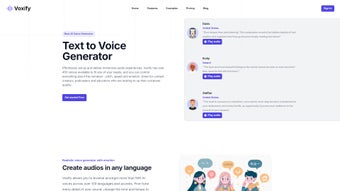

Download Voxify – AI Text‑to‑Speech Generator, Free Trial, Secure Voice Over Tool
Voxify is an innovative AI voice generator that transforms any written text into high‑quality, natural‑sounding speech within minutes. Powered by state‑of‑the‑art deep‑learning models, Voxify supports more than 140 languages and regional accents, giving creators the flexibility to reach a global audience without the need for costly recording sessions. What truly sets Voxify apart is its extensive customization engine: users can fine‑tune tone, style, pacing, and even inject emotions such as happiness, sadness, or excitement to match the mood of their project.
Whether you’re producing e‑learning modules, marketing videos, podcasts, or accessibility‑focused applications, Voxify delivers fast processing, crystal‑clear audio, and a user‑friendly interface that requires no prior technical expertise. Flexible subscription plans cater to freelancers, small businesses, and large enterprises, ensuring that every budget can benefit from AI‑driven voice‑over capabilities. In this review we’ll explore the core features, installation process, system compatibility, and the real‑world pros and cons that help you decide if Voxify is the right tool for your text‑to‑speech needs.
Key Features and Customization Options
- Support for 140+ languages and regional accents, including rare dialects.
- Emotion engine that adds happiness, sadness, excitement, anger, and more.
- Adjustable parameters: tone, pitch, speed, and articulation style.
- Batch processing for large scripts, with a maximum file size of 500 KB per request.
- API access for developers to integrate Voxify into web, mobile, or desktop applications.
- Cloud‑based rendering ensures fast turnaround—most texts are processed in under 30 seconds.
- Secure data handling with end‑to‑end encryption and GDPR compliance.
- Multi‑platform web UI with drag‑and‑drop script upload.
- Audio export formats: MP3, WAV, OGG, and AIFF at up to 48 kHz.
- Flexible subscription tiers: Free trial (5 minutes/month), Personal, Business, and Enterprise.
Beyond the list above, Voxify’s strength lies in its ability to sound genuinely human. The underlying neural network has been trained on thousands of hours of professional voice recordings, allowing it to capture subtle nuances such as breath pauses, emphasis on key words, and natural intonation curves. This makes the generated speech suitable for professional environments where authenticity matters, such as corporate training videos or customer‑service bots. The platform also offers a “Voice Library” where users can save custom presets—perfect for maintaining brand consistency across multiple projects. For teams that need collaborative workflows, Voxify includes role‑based access controls, version history, and shared folders, ensuring that content creators, editors, and managers can work together without stepping on each other’s toes.
Installation, Usage Instructions & System Compatibility
Voxify is delivered as a cloud‑based SaaS solution, which means there is no heavy client to install on your machine. To get started, simply visit the official website, click the “Sign Up” button, and create a free account. After confirming your email, you’ll be redirected to the dashboard where the web‑based editor resides. The interface is intuitive: paste or type your text into the main pane, select a language and voice profile from the dropdown menu, then adjust the sliders for tone, speed, and emotion. A preview button lets you listen instantly before committing to a full render.
For developers who require deeper integration, Voxify provides a RESTful API with comprehensive documentation. After generating an API key in the account settings, you can send POST requests containing your script, language code, and optional parameter JSON. The service returns a downloadable link once processing is complete. Sample code snippets are available for JavaScript, Python, and Java, making integration straightforward for web apps, mobile platforms, or desktop software.
Because Voxify runs entirely in the browser, it is compatible with any modern operating system that supports HTML5 and JavaScript, including Windows 10/11, macOS 12+, Linux distributions, Android 8+, and iOS 13+. The mobile web experience is fully responsive, and the API can be called from native Android or iOS apps using standard HTTPS libraries. No additional plugins or runtimes are required, which keeps the installation footprint at zero and ensures that updates are applied automatically on the server side.
When it comes to security, all data transmitted between your device and Voxify’s servers is encrypted with TLS 1.3. Uploaded scripts are stored only for the duration necessary to render the audio and are deleted after 24 hours unless you enable the “Save Project” feature, which stores the content securely in your personal workspace. This approach satisfies most corporate compliance policies and makes Voxify a safe choice for handling confidential or proprietary material.
Pros, Cons, and Frequently Asked Questions
Pros
- Extensive language and accent library—ideal for global projects.
- Emotion controls create engaging, expressive speech.
- Fast cloud processing; most files render in under 30 seconds.
- No installation required; works on any device with a modern browser.
- Robust API for developers and enterprise integration.
- Secure, GDPR‑compliant data handling.
Cons
- Free tier limited to 5 minutes of audio per month.
- Advanced voice‑tuning features may require a learning curve for beginners.
- Batch uploads larger than 500 KB need a Business or Enterprise plan.
- Audio quality, while high, can still reveal a synthetic feel in very long monologues.
Frequently Asked Questions
Can I use Voxify for commercial projects?
Yes. All paid subscription tiers include a commercial‑use license, allowing you to embed the generated audio in marketing videos, podcasts, e‑learning courses, and other revenue‑generating content without additional royalties.
Is there a way to keep my generated voice files private?
Absolutely. Voxify stores files in an encrypted private workspace. You can set project visibility to “Only Me” or share with specific team members via invitation links. Files are deleted from the server after 30 days unless you download them.
How accurate are the accent options for less common languages?
Voxify’s AI models have been trained on large, diverse corpora, resulting in highly accurate pronunciation for most major languages. For niche dialects, the system still delivers intelligible speech, though subtle regional quirks may be less pronounced than a native speaker.
Can I integrate Voxify with my existing video editing workflow?
Yes. After rendering, you can download the audio in MP3, WAV, OGG, or AIFF formats and import it directly into Adobe Premiere, Final Cut Pro, DaVinci Resolve, or any other editing suite.
What payment methods does Voxify accept?
Voxify accepts major credit cards (Visa, MasterCard, American Express), PayPal, and enterprise customers can arrange invoicing with net‑30 terms.
Overall Rating: 4.5 out of 5 stars – Voxify delivers a compelling mix of language coverage, emotional depth, and ease of use, making it a top choice for creators who need high‑quality AI speech without a steep learning curve.
Conclusion – Is Voxify the Right Text‑to‑Speech Solution for You?
Voxify positions itself as a versatile, cloud‑native AI voice generator that meets the demands of both individual creators and large enterprises. Its broad language library, emotion engine, and granular voice‑tuning tools give you the creative freedom to produce professional‑grade voice‑overs quickly and securely. While the free tier is modest, the paid plans are competitively priced and unlock features that most serious users will need, such as batch processing and API access. The zero‑install, browser‑based experience removes technical barriers, and the robust security model ensures that sensitive scripts stay private. If you’re looking for a reliable, scalable text‑to‑speech platform that can handle multilingual projects and deliver expressive audio, Voxify is definitely worth a test run.
Ready to transform your written content into engaging speech? Download Voxify now and start your free trial today. Experience the power of AI‑driven voice‑overs and see how quickly you can elevate your videos, podcasts, and accessibility solutions.



.png)



